Has the article editor become nearly unusable since the latest update - or is it just me?

First of all, I want to say that I genuinely appreciate tawk.to as a product. It’s rare to find a platform that offers so many features for free, continues to evolve. Yes, the editor was a bit outdated, but it was stable, predictable, and it allowed us to work efficiently.

After yesterday’s major update, I’m honestly a bit shocked.

I wonder - is it just me that is experiencing this issues? Maybe I do not have the latest version?

I am experiencing this:

It’s obvious that the team has tried to modernize the editor - some interactions resemble Notion, such as typing / for commands, inserting headlines, etc. The idea is good. However, the execution has left me deeply frustrated.

From my perspective, the update has not introduced any meaningful improvements for the core task of writing, editing and structuring articles. Instead, essential functionality has disappeared—or is now extremely difficult to use.

Here’s what I’m experiencing:

:exclamation: Basic actions are now extremely inefficient

It is no longer possible to select and manipulate multiple blocks of text at once. Removing or moving content has become a painfully manual process. If you have dozens of content blocks, each block has to be individually dragged, deleted, or repositioned.

This transforms simple adjustments into tedious, error-prone tasks.

:exclamation: Copying content from external editors no longer works seamlessly

I’ve now resorted to drafting articles in Notion first - even though formatting doesn’t reliably survive when pasted into the tawk.to editor.

I genuinely ask myself: How did this version get shipped in this state?

As a product manager and designer myself, I am aware that modernizing legacy UX/UI is challenging. But shipping a major editor overhaul without preserving fundamental workflows is not something that should happen at product scale - especially when tawk.to positions itself as having the largest market share in this space.

Even though the platform is free, this should not be the quality standard.

So my question to the product team:

:point_right: Is this still part of unresolved post-release bugs, or is this really the intended new experience?

If it’s bugs: please fix them as soon as possible.

If it’s intentional: then I honestly urge you to re-evaluate usability and parity with basic functionality of other modern editors.

If you try to replicate Notion - what is good! - then please replicate it properly.

At the moment, it feels like a downgrade on almost every operational level.

Sorry for the frustration in my tone - but I’m genuinely disappointed, and I’m curious whether others are experiencing the same difficulties.

Thanks for reading, and I truly hope this will improve soon.
3 Likes

Hey @justboty2k,

Thanks for your feedback, and sorry to hear that you’re experiencing issues with the new editor?

To speed up the process and ensure we’re on the same page, could you please record a quick video on jam.dev so that we can understand exactly what’s wrong with the experience?

If you don’t want to share it publicly, you can email it to me at kristaps@tawk.to, and we’ll look into it ASAP.

Thanks for taking the time!

2 Likes

I have to agree with you, this change feels more like a downgrade than an upgrade.
I’m also unable to see or click on the images in the guide when editing, and if I upload one I can’t save the guide.

1 Like

Hey @kristaps,
Thanks for reaching out so fast - much appreciated.

I sent you the link of the video per PM as I am not allowed to include links in my replies here.

Thanks + Best

I’m new here and not sure if I’m posting correctly but my KB editor is now not functioning with regard to adding a video to an article. surely you didn’t mean to remove this facility?

@chris.owna @captainkeith We’ve fixed the issue where articles with images and videos cannot be saved. Please check it out and let me know if you are experiencing any other issues.

@justboty2k thanks, I’ll check it out.

I have to agree with you, this change feels more like a downgrade than an upgrade.

@chris.owna could you please elaborate with specific, actionable feedback?

Thanks

Now that I was able to create the first Editor this are further observations:

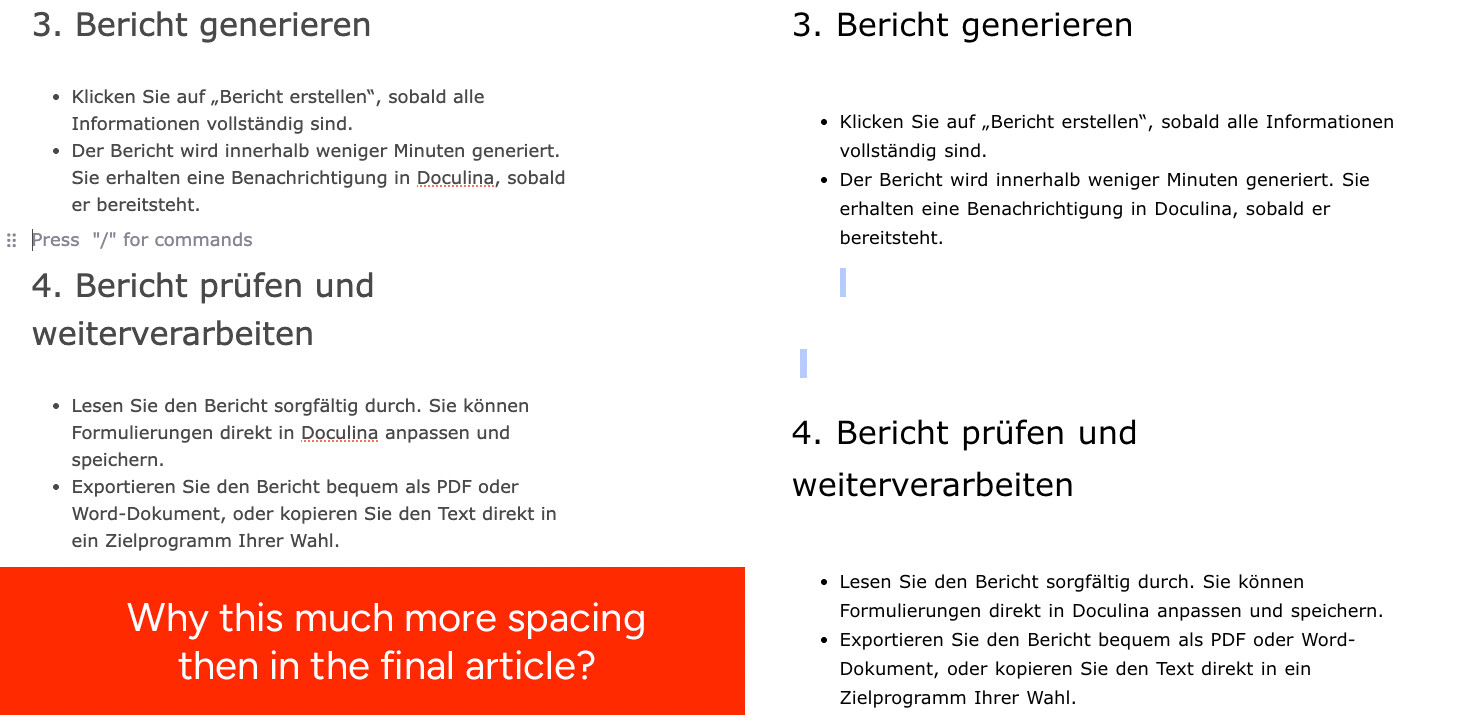
The spacing in the article editor and in the actual knowledge base articles is very far apart / inconsistent — you basically have to adjust the spacing in the editor in a way that looks really bad, actually pretty reader-unfriendly, and where the text feels cramped, just so that it looks somewhat okay in the final article.

As you can see in my screenshot: for example, when I have a single blank line in the editor, it becomes two blank lines in the published article, and so on…

It’s really difficult to create a reader-friendly article this way…

Best

Update:

I can confirm the follwing fixes:

  • Images and deviders are visible after adding now.
  • Articles with images can be saved
  • Text that is pasted into a heading section is displayed in the corresponding stying.
1 Like

Hi @justboty2k,

Thanks for acknowledging that these issues have been fixed and now working on your end.

Regarding your video about pasting content that has different styling and elements (such as images and videos). We didn’t have this functionality in the previous release, so this is a new feature request.

The team will prioritise fixing any bugs from the release, but we have added this to our KB enhancement roadmap.

Let me know if you’re still experiencing any critical issues with the KB, and we’ll get right on it.

1 Like

@kristaps Thanks for the update. I understand that these features may not have been within the initial scope of the KB update — but I believe that’s exactly where the issue lies. These are basic functionalities that any text editor needs in order to feel intuitive and smooth. Without them, this version is simply harder to use than the previous one.

That said, I really appreciate how quickly you and the support team responded and how actively you’re working on a solution. Kudos to you and your team for jumping on this so fast.

One more thing I noticed: the bold formatting for headlines isn’t working at the moment.

@justboty2k

These are basic functionalities that any text editor needs in order to feel intuitive and smooth.

I disagree. You can’t paste media in a .txt file.

Does the current version lack features that were available in the old version? No, it doesn’t.

Would this be a great UX improvement? Yes, absolutely.

If I have missed anything, please let me know.

Bold formatting for headlines isn’t working at the moment.

Thanks, we’ll look into it.

That said, I really appreciate how quickly you and the support team responded and how actively you’re working on a solution. Kudos to you and your team for jumping on this so fast.

Appreciate your feedback, keep it coming!

I observed a bug, where the bullet point created in the editor (left) is not shown correctly in the live version (right):

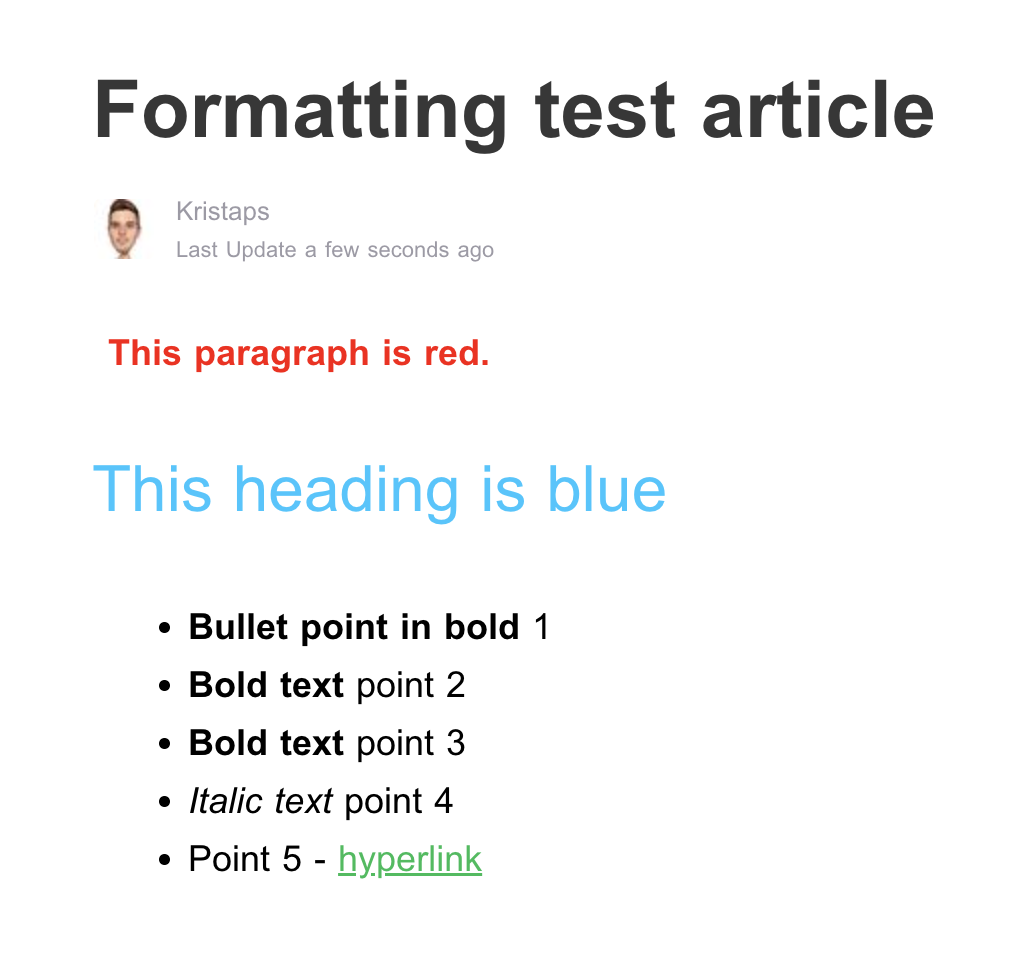
What you can also see, when a text is pasted into the editor the “bold” formatting is displayed in the editor but not in the final articel - I have to mark it and “unbold” it and “bold” it again.

  • The Preview function appears to be broken since the update (it opens with “undefined/article/custom-forms?preview…” in the URL with an error saying the page can’t be reached)
  • If you could please fix the heading text colour not showing in the editor, that would be great.
  • Also, text that is hyperlinked is indistinguishable from regular text unless you hover over it.
  • I’d also much prefer the ability to simply click on what blocks I want to add instead of having to type / each time.
1 Like

Hi @justboty2k, @chris.owna, we just tested all scenarios and the formatting appears to be showing correctly in the live preview or when published.

Note that the colour of the article’s title cannot be changed.

@chris.owna

  • The Preview function appears to be broken since the update (it opens with “undefined/article/custom-forms?preview…” in the URL with an error saying the page can’t be reached)

We can’t seem to reproduce this. Are you using a custom domain via the Remove Branding add-on with your KB by any chance?

  • If you could please fix the heading text colour not showing in the editor, that would be great.

We’ll look into this.

Let me know if you’re experiencing any other issues?

Thanks kristaps for keep working on that!

here is the deal: When I copy formatted text from word - one line bold, one line regular - this is overtaken in the editor AND in the preview. When i copy formatted text from notion - one line bold, one line regular - this is overtaken in the editor but not in the preview / actual article. This is why i have to “unbold” → “bold” every other text i copied from notion (where I write my articles ) and pasted it in tawk article editor.

My exptected behaviour is: What is shown in bold in the editor view should also be bold in the preview / actual article. Better than the current behaviour would be, if the “bold” formatting from notion would not be overtaken in editor view ← this causes that i think everything works - but it doesnt in the actual article.

Hope that helps! All the best

Hey@justboty2k
You’re definitely not alone — I’ve seen similar feedback from others since the update, especially around multi-block selection and content manipulation. It feels like the editor gained surface-level “modern” features but lost some of the basic productivity workflows people rely on for long-form writing

1 Like

Hey @justboty2k, I hear you, and we’ve almost completed an update that will address this and ensure that whatever you see in the editor will match what’s shown in the preview when the article is published.

Don’t expect it to work like Notion. But these UX issues will be fixed shortly.

1 Like

Thanks to you and your team Kristaps - much appreciated!

1 Like