
Pre-Chat form is important to us. The users leaves his contact details there. But Apollo reacts to the Pre-Chat form as a user message, although it is not. Apollo does not understand that the Pre-Chat form is not a message from the user.
3 Likes
Hi @Kaziazar, this is not possible, because the pre-chat form is sent as a message and Apollo is configured to respond to all messages.
However, if Apollo is providing an undesired response, you can edit the first line in the base prompt to instruct it on how to greet your customers:
- Visitors will fill out a pre-chat form at the start of the conversation. Greet them by saying “Hej og velkommen til Lokalebasen!” in the visitor’s preferred language and answer their question(s), or if no questions are provided, ask how you can help.
Let me know if this solves the problem and if you have any questions?
Cheers,
Kris
1 Like
Thanks for the advice. Now it works as it should.
You’re most welcome! I’m glad you found this tip useful. If there’s anything else you need, don’t hesitate to reach out.
1 Like
you can’t configure Apollo to ignore pre-chat forms. It responds based on the input it receives, so you would need to design your conversation to exclude the pre-chat form from the input. Check for any updates from the platform you’re using for potential changes in this regard.
Regards
Singapore Restaurants Menu
Hi @michaelaskew,
The solution was posted above.
To make your Apollo AI bot compatible with the pre-chat form, simply copy/paste the text below into your AI Assist Base Prompt. Feel free to replace the greeting in the quotes with whatever you prefer.
Here is the template:
- Visitors will fill out a pre-chat form at the start of the conversation. Greet them by saying “Hi there, thanks for reaching out!” in the visitor’s preferred language and answer their question(s), or if no questions are provided, ask how you can help.
Are you experiencing any issues with this prompt? I’ll do my best to help.
1 Like
I’m having trouble with that, i copied the prompt and is not working I have prechat form just asking for name and email, and because i have the second escalation toggle on, no matter what I change on the base prompt. apollo always escalate. because it tries to find an answer for name and email sent by the pre chat

so the only real solution is to always ask for a question on the pre chat form.
Thanks for reporting this and sharing the video, @LEOHDZ. We’ll look into this.
Can you confirm this always works correctly if you’ve added a question field in the form?
Yes if I add the message question on the pre chat form Apollo works fine and answers the visitor question.
I think it would be really really useful if you could toggle it so a pre-chat form didn’t actually request a chat until the user manually typed in another message. For example, I use triggers to provide suggested messages when the chat window is maximised and before the user has been served - which looks like this:
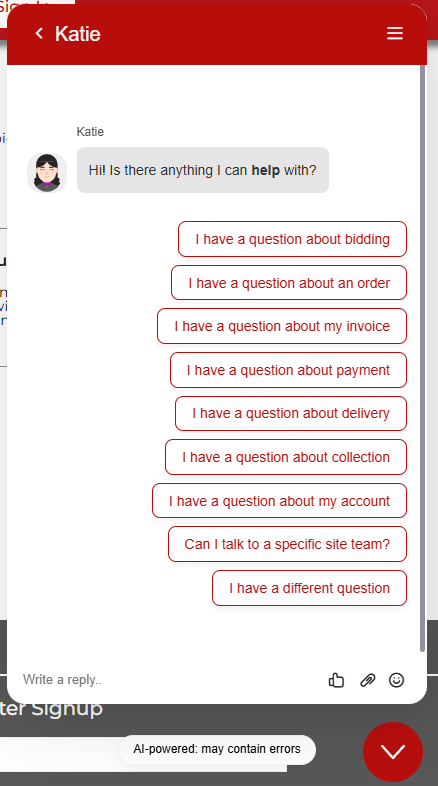
This is completely messed up when I use a pre-chat form as even if I just ask the user to input a name and email address, the AI immediately starts replying to that and overwrites the trigger. Do you have any suggestions for this? I feel this would easily be resolved by having a toggle in pre-chat settings for whether or not the pre-chat output will trigger the AI to join.
Hi @KiranK,
Yeah, this is incompatible with the Pre-chat form.
Instead, you can train your AI to send the same message as a greeting when the customer fills out the pre-chat form.
Keep the welcome message Trigger text-only (w/o suggested messages) if you’re using a Pre-chat form.
So the flow would be this:
A - Greet visitor with a welcome message (this is, of course, optional)
B - Visitor fills out the pre-chat form
C - AI greets them with all of these options
Does that solve the problem?
1 Like
Hi @kristaps
It would potentially solve my problem if I only had 1 set of suggested messages. However I have lots of different sets of suggested messages via different triggers based on which page of the website the user is on.
For example, I have sets for the home page, contact us page, login page, register page, lot pages, sale pages etc.
It would seem the only solution to my issue is a feature request to be able to toggle whether or not the pre-chat form will trigger the chat to start or not. Ideally for me, it would just assign the pre-chat values to the users contact name and email, not send any message, and just open the chat as normal with my URL based suggested messages.
Feature Requests
Hi @KiranK, understood, thanks for clarifying. That changes things.
In that case, my recommendation would be to turn off the pre-chat form and prompt your AI agent to capture the user’s details.
But if you require the pre-chat form, then, unfortunately, there’s currently no full workaround.
I’ll update our tracked ticket for this request, adding the context you shared.
Hi @kristaps
Thank you very much!
How would you recommend achieving this “prompt your AI agent to capture the user’s details.” ? And would that be applied to the users contact details like pre-chat is or no?
Hey @KiranK, great questions:
How would you recommend achieving this “prompt your AI agent to capture the user’s details.” ?
- Add a new line in your Base Prompt, define the part of the conversation where you want this to happen and add: “ask the customer for their name and email address.” (and/or any other details you need it to gather)
And would that be applied to the users contact details like pre-chat is or no?
- No - answers will be saved in the chat transcript, not automatically mapped to contact fields.
Hope this helps!
Hi @kristaps
- Would this be easily searchable when searching through all chats?
-
Another suggestion I have then for a solution (besides the pre-chat toggle I mentioned earlier) would be to have an additional form you can add to a shorcut that isn’t a lead capture form or a ticket form, but instead a sort of contact details form to add to the contact where it takes data from the user that can then be applied to their Tawk contact. This could be used in an initial message and the chat will be unable to proceed until it is done. Typing could be disabled for example. I definitely prefer my earlier suggestion, but this would be a viable option.
-
On a similar note, it would also be great if we could toggle when users can type their own questions. For example, typing could be disabled until the user presses a certain suggested message such as “I have a different question” and then typing is enabled. It would be great if you could pass that on as a feature request also?
Feature Requests
Hi @KiranK,
You could search for the prompt phrase (e.g. “what is your name”) to find those chats, but the responses won’t be mapped to contact fields. You’d need to read through each transcript and you can map them manually.
For structured data collection, you can actually use the same lead capture form you mentioned via a shortcut with an AI question. Name, email and phone number fields map directly to the contact and all the fields are customisable.
All great suggestions!
We’re actually thinking about an alternative for the pre-chat form, which would be a conversational flow:
- List questions you want to ask, linked with contact fields the answers will be mapped to
- e.g.: “Before we continue, could you please share your email address?”
- Typing would be disabled until the user responds to all questions – similar to the pre-chat form
No timeline yet, but this is in our backlog.
1 Like
Hi @kristaps
This sounds amazing and exactly what I’m looking for! I presume this would be once per customer and then if they use chat again, it would recognise them as a returning contact and skip this step?
I would love if interest in this feature could be pushed to the dev team as this would solve my companies biggest issue with live chat right now.
Regarding your lead capture form suggestion. As it is a shortcut it must be attached to, it can be hard to trigger it at the right time. Is it possible to force a specific shortcut (the one containing the lead capture form) to be used initially in the chat via the base prompt? And to then get the AI to respond to the initial question the user entered only after the form has been submitted?
Thanks
Hi @kristaps
Apologies, I have a follow-up. I have been dabbling with trying to get my system to work with the pre-chat form as it is. At the minute I have it looking like this:
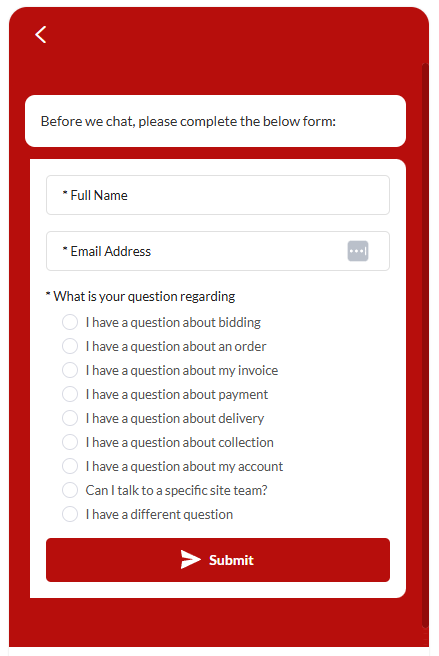
This is to replace / recreate my old initial suggested messages that would appear when the chat window was maximised.
Then in chat , that looks like this:
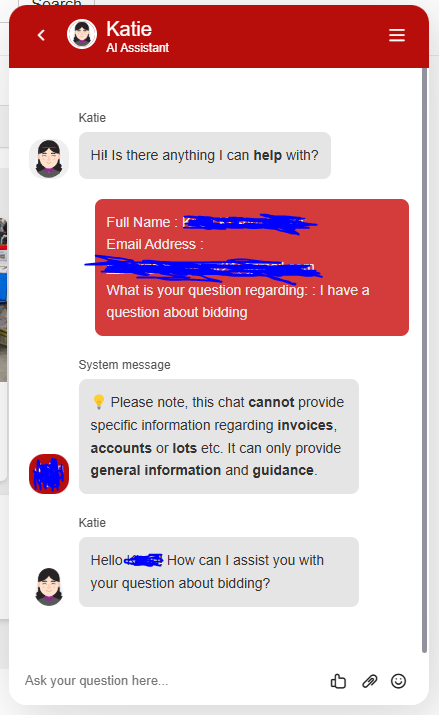
Which is not ideal. Is there a way (using the base prompt) I can get the AI to ignore all the text from the pre-chat and only acknowledge text after "What is your question regarding: " as I have “I have a qustion about bidding” as a trigger for a shortcut that brings up more suggested messages. Ideally, it should look like this:
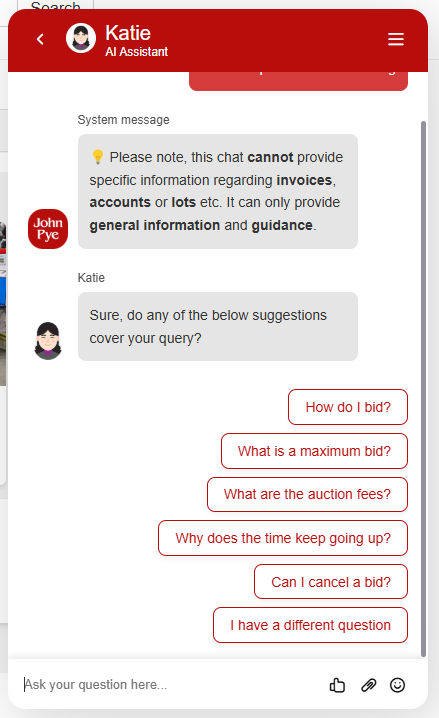
I tried to achieve this in my base prompt with this:
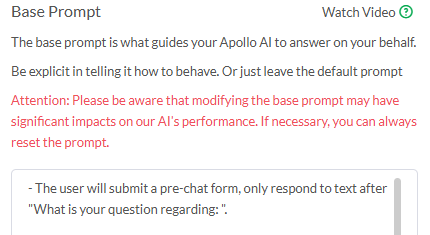
But, it did not work. Do you have any suggestions?
Thanks
Hi @KiranK,
What you’re trying to do can be achieved by using the following Base Prompt script:
Visitors start a chat using the pre-chat form. Always include this in your initial greeting:
"Hi there, thanks for dropping in. How can I help?
[option] I have a question about bidding
[option] I have a question about an order
(…and so on…) "
– If response has “[option]” always include it as plain text. It will display a clickable button.
With this approach, remove the “What is your question regarding” field from your Pre-chat form.
And create a deterministic chatflow (based on what they select) using Shortcuts + the Shortcut AI Question field.
Learn more here: Help Center | tawk.to | Suggested Messages and AI Questions