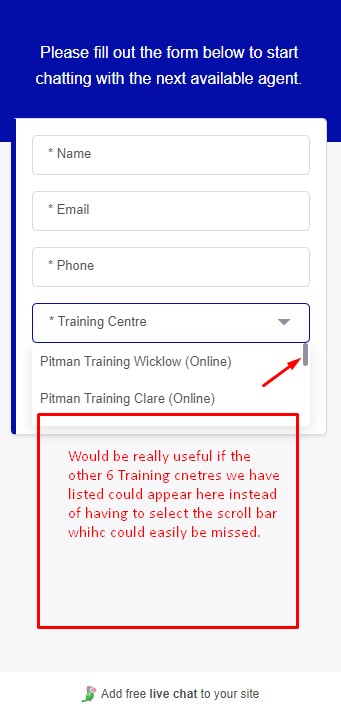
it would be really helpful and make the widget a lot more user-friendly if more than 2 entries were displayed when a user clicked on the widget dropdown menu.
You can resize the widget yet the dropdown menu option is restricted to just 2 entries, and scrolling to the others is far from obvious.
Seems like a very simple update here would really add significantly to the widget functionality and usability,
Otherwise the widget functions brilliantly and TawkTo overall is a wonderful service. Thank you for taking this feedback on board, looking forward to seeing the improvement.
Thanks for following up! We don’t have any new information or updates on this just yet. We understand how important this is for your workflow, and we’ll be sure to let you know as soon as we have more information.
This bug seems to occur when you have no fields below the dropdown menu option. So for example, if you add a free text fields below the Training center selector it will instead show 5 or so options at one time.