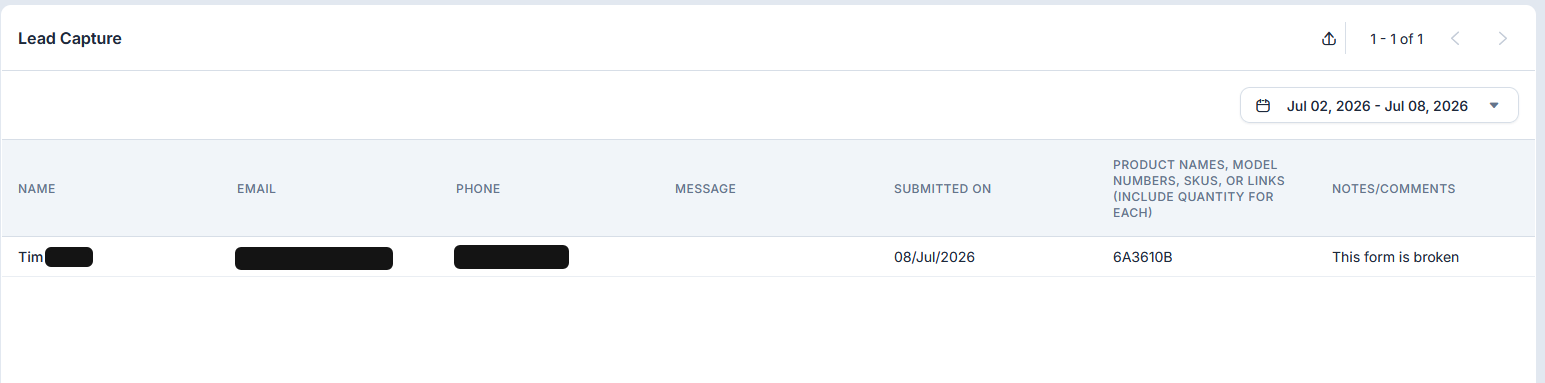
A couple of problems with the lead capture form:
- It only works in chat. I cannot send it to any of my other channels. Sort of defeats the purpose.
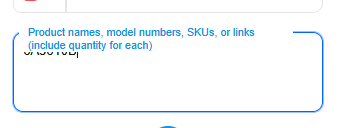
- In chat, the form fields collide with one another. In the screenshot below, see that the name of the field is covering up the text area where the answer goes.
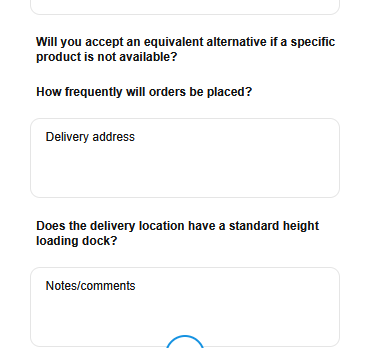
- In chat, the option questions are not working. In the screenshot below, see that “Will you accept an alternative”, “How frequently will orders be placed” and “Is there a standard height loading dock” questions have no answer fields. They are configured as required option fields.
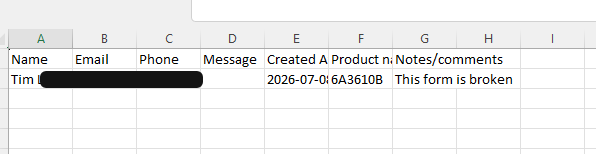
- Then when it comes to collecting the data, all of the additional fields are missing from the results anyway. And that includes in the export.
- There is no way to delete or dispose of a lead.
- Finally, when a lead comes in, there is no way to convert that lead into action because there is no integration with the other tawk.to tools. So you have to manually copy/paste the lead information into a contact and open a ticket or place a call or whatever. And that is difficult since you can only have a single tawk.to tab open.
So what exactly is this feature for? It doesn’t seem to do anything useful and not well planned or developed.
Hi,
Thanks for taking the time to share your detailed feedback. We appreciate you outlining each of the issues you’ve encountered.
- You are correct. At the moment, the Lead Capture form is only supported within chat and cannot be used across other communication channels.
- Unfortunately, there isn’t currently an option to customize how the Lead Capture form is displayed to visitors. We understand how the field layout you’re seeing could impact usability.
- Regarding the option fields that are not displaying answer inputs, thank you for bringing this to our attention. I’ll report this to our team so they can investigate the behavior.
- Could you please send us a direct message regarding the missing field data in the export? If possible, include an example or screenshots. I’ll make sure this information is included in the report for our team to investigate.
- That’s correct. At the moment, Lead Capture entries do not have the same management options as Contacts or other records, including the ability to delete or dispose of individual leads.
- Thank you for sharing your thoughts on the workflow. I will also forward your feedback regarding better integration between Lead Capture and the other tawk.to tools. We understand how being able to convert leads into actionable items without manual copy-and-paste would improve the overall experience.
We genuinely appreciate your feedback, as it helps us identify areas where the product can be improved.
I am still not sure what this feature is intended for.
The Lead Capture Form is designed to collect a visitor’s information during the chat. This is particularly useful for users who prefer to let AI handle the initial conversation and capture lead details during the interaction or through a trigger message, rather than requiring visitors to provide their information before the chat begins.
Previously, the Pre-Chat Form was the only option for collecting visitor information. We introduced the Lead Capture Form to provide greater flexibility, allowing customers to choose the method that best suits their workflow and the experience they want to provide for their visitors.
Gotcha. But it doesn’t work…
Would you mind sharing a screen recording or a screenshot showing the issue where the Lead Capture Form isn’t working? This will help us better understand the problem and investigate it further.
Got it! I’ve already responded above with a breakdown of each of your concerns. I’ve also forwarded the key points of your feedback to our team so they can review them and consider improvements to the feature.
It does not work in the current implementation. So I am asking, what is the purpose of this feature that doesn’t work? You are considering making it a working feature?
The feature is working in its current implementation. However, we understand that it doesn’t fully align with your preferred workflow or address some of the points you’ve raised. That’s why we’ve forwarded your feedback to our team as enhancement requests so they can review possible improvements.
No it’s not. I can add custom fields to the from setup, but their fields don’t appear correctly to site visitors, and they are not actually collected. That’s non-functional.
Thanks for the clarification. I understand how frustrating that must be.
This issue has already been forwarded to our team, and they’re actively working on a fix. We’ll keep you updated as soon as the fix has been deployed.
Enhancement requests or bug fixes have been forwarded to the team?
Yes, I’ve already forwarded this to our team for review. They’ll take a closer look at it, and we’ll share any updates as soon as we have more information.
Hi @dedicatedpresentatio ,
Could you please confirm which device and operating system you’re using? Our team is currently investigating this issue and is working to replicate it so we can ensure the feature functions as expected.
Windows desktop PC with the latest version of Mozilla Firefox, using the browser version of tawk.to, not the desktop app.
Thanks! Could you please check on your end and let us know if the issue/bugs is still occurring?
Based on our latest update:
- The field headers no longer overlap or block the answer fields.
- All question fields are now present, and there are no missing fields.
- When exporting data collected through the Lead Capture Form, all fields are included in the export.
Yes, this appears to be working now. Will there be integration into the Pipeline function?
1 Like
I’m glad to hear it’s working now!
As for Pipeline integration, I’m sorry, but I can’t confirm whether that’s planned. We don’t have a public product roadmap, so I’m unable to comment on upcoming features or provide any timelines.